First Draft using AI in Figma
Questions


Student Gallery
Be the first to share something.
Course info
Overview
Course length: 9+ hours.
Try Figma for free by clicking here.
Requirements:
Who this course is for:
- UX/UI adventurers who already have a basic understanding of Figma.
- Self-taught Figma enthusiasts yearning for structured guidance.
- Graduates of my Figma Essentials Course, hungry for more knowledge and skills.
- Visionaries who have developed their own unique Figma approach but crave exploration of the vast universe of tools, updates, and time-saving techniques.
AI & Interaction Design
- First Draft & Add Interactions Using AI
- Suggest Auto Layout, Replace Content, Duplicate & Rename Layers (AI)
- AI Add Interactions Automatically
Layout & Auto Layout Mastery
- Working with Complex Layouts
- Nested & Responsive Auto Layouts
- Auto Layout Grids
- Grid vs Constraints vs Auto Layout — Which One to Use and When?
- How to Add Rows and Column Grids to One Layout
- How to Create & Update Layout Guide Styles for Columns & Rows
- How to Overlap & Stack Using Auto Layout
- Ignore Auto Layout to Absolute Spacing
- Minimum & Maximum Width/Heights
- How to Wrap Auto Layout Objects
Components, Variables & Variants
- Using Variants
- Multi-Dimensional Variants
- Variable – Light and Dark Modes
- Cart Totals Using Number Variables
- Conditions in Variables
- Boolean Variables
- Overlay Popups
- Spacing with Number Variables
- Boolean Component Properties
- Form Fields with Component Properties
- Instance Swap Inside a Component
- Organizing Components
Design Techniques & Visual Effects
- Liquid Glass Effect
- Texture, Noise & Effect
- Progressive Blur Effect
- Saving Effect Styles & Clearing Unused Styles
- Houdini Text
- Spring Animation & Overlays
- Masking Images Using AI Remove Background
- Spillover Masks
- Mask Images with Text
- Colour Layer Blending Modes
- Curving Text
- Vertical Trim
- Truncation
Animation & Interactions
- Custom Easing
- Animation Inside Variants
- Sticky Scroll Position Search Bars
- Horizontal Scrolling/Swipe
- Automatic Scroll Down to Anchor Point
- Interactive Components
Video & Media
- Working with Video
- Play/Pause Video Controls
- Video to Play on Hover
Typography & Color Systems
- Advanced Color Tricks
- Change/Replace Colors
- Color Themes for Light and Dark
- What is Good Spacing for Web & App Design
Accessibility
- Making Your Designs Accessible
Drawing & Vector Tools
- Advanced Drawing Tips and Tricks
- Variable Width Tool & Simplify Stroke
Workflow, Collaboration & Handoff
- Workflow Tips & Tricks
- Advanced Copy, Paste, and Selection Tricks
- Frame Tips and Tricks
- Sections
- Layer Zen in Figma
- Advanced Search
- Bulk Rename Layers
- How to Use Dev Mode
- Document a Component in a Design System
- Version History
- Slice Tool
- Team Libraries
- Refactoring Components
- Forum support from me and the rest of the BYOL crew.
- All the techniques used by UX professionals
- 107 videos of detailed Figma Advanced Content.

Daniel Walter Scott
Founder of Bring Your Own Laptop & Chief Instructor
I discovered the world of design as an art student when I stumbled upon a lab full of green & blue iMac G3’s. My initial curiosity around using the computer to create ‘art’ developed into a full-blown passion, eventually leading me to become a digital designer and founder of Bring Your Own Laptop.
Sharing and teaching are a huge part of who I am. As a certified Adobe instructor, I've had the honor of winning multiple Adobe teaching awards at their annual MAX conference. I see Bring Your Own Laptop as the supportive community I wished for when I was first starting out and intimidated by design. Through teaching, I hope to bring others along for the ride and empower my students to bring their stories, labors of love, and art into the world.
True to my Kiwi roots, I've lived in many places, and currently, I reside in Ireland with my wife and kids.
Certificates
We’re awarding certificates for this course!
Check out the How to earn your certificate video for instructions on how to earn yours and click the available certificate levels below for more information.
Downloads & Exercise files
Transcript
Hi everyone.
We're gonna start the course looking at a feature
called First Draft.
Okay? It's AI driven.
It's a great way to kind
of get templates, get kind of started.
Um, it's more useful once you've got a few more
of the skills from this course to kind of take it further.
But I wanna show it now 'cause it's awesome
and it got ready to get started with projects.
So you can see down here I've got the prompt open, okay?
And I'm gonna say it's a basic app.
Make a checkout page for a music event app
and boom, there you go.
It's made a checkout page.
I could play around with the styles and fonts, okay?
But it is something generated from scratch,
from Fig MA's ai.
Let's jump in and look at the pros and cons of it
and how to kind of get it working for you.
We'll also look at the AI feature for ADD interactions.
Alright, let's go.
Alright, so I'm in a new blank design file.
I'm in design, this little tab on the bottom here,
and I'm gonna go to actions.
Now this one here is a paid feature.
Um, so just watch if you're on the free one.
It is, uh, where is, it's called First draft,
so you might search for it.
I've found mine here under Design Tools. Gonna click it.
Okay? The cool thing about it, you can kind
of give it some guidelines as in,
do I want a basic app or a wire frame?
Okay, does it need images or not?
You know, uh, basic site or a site wire frame.
Okay, we've looked at that before.
High fidelity, low fidelity.
Um, so I'm gonna do an app
and I'm gonna say I want it to be, um, it's an event
listing app for music
and just click, make it stand back.
Watch the AI bots do the little thing.
Oh, that was quick thought.
We might even have to jump cut and fast.
Oh, Coldplay, Taylor Swift, I'm out it Sharon, Billy Eilish.
It's not my music. Um,
but what you can see here is it's actually built this
unique app for you.
Um, it is generating, uh, these images.
These images are like it's AI engine making them.
That's why sometimes they can take a little while
and they're kind of like sparkly,
but oh my goodness, it's made an app.
Look at it. This is cool. Let's prototype it. Let's go. Yep.
Okay. And so a look, I like it.
What works, what doesn't? Okay, it's just kind of mocked up.
Doesn't do a whole lot. There's not of, um, interactivity.
You can like in the essentials course go,
you actually, let's look at something else.
Um, let's, at the Colors watch at this.
That's the first colorway. Okay?
You can see, you can go through and say,
oh, I like these ones.
It's a great way to get started.
And once you'll finish this course, the advance one,
you'll be able to add all the interactivity
and all the right ways to kind of get it out for designs.
It's like working with a template except the template.
You get to be very customized, okay?
Especially for things like the colors, things like,
it's like make changes as well.
Look, you can say actually rounded corners.
I want super rounded corners. No rounded corners.
We're going for the boxy look, okay? The spacing.
We want to open that up. It's just very cool.
Oh, what kind of fonts do you wanna use?
Okay, you can work through it.
You can prompt it as well to say, um, can you, uh, add
a large hero
Box?
I dunno if this is gonna work, by the way, okay?
But you can start prompting it to do stuff.
It would be probably easier for me to do a lot
of small changes myself, okay?
'cause it's done a version of it.
It's not the thing I had in my head.
So that's gonna be the tricky part. So you can prompt away.
And sometimes it's easy just to make it.
Let's have a look, uh, under assets, okay?
It has got no assets for this particular, um, document.
There's no library, there's no styles for it.
Maybe that'll change by the time you get to it,
but now there's still a lot of work to do.
But very cool way to get started.
Once you've got some skills, you can't just
be a UX designer.
Go, all right, I've learned nothing about fig.
I'm just gonna use the prompt.
Maybe that's possible in the future.
I don't think so, but I wanna show you that there.
The other thing I wanted to show you from the essentials
course was, let's say we wanna make another page.
Let's go you and let's select it all and delete it.
And this one here, we're gonna go back to our prompt again
and we're gonna say, uh, we got first draft.
Okay? And I'm gonna say event
and listing in detail.
C oh, spell it right Then here we go.
Alright, it's gone. And here it is.
It, oh, it has made a new page rather than trying
to use the one that I made for it.
But you can see here, has it used the same fonts?
Let's have a look. Uh, public sands.
And this one is, uh, no outfit. So it's gonna get better.
You know, I'm looking forward to the time
where I just need a really basic page, like a T's
and C'S page or a checkout page
that looks like a really trustworthy one.
And it can take the styles
that you've already got and then apply them.
That's probably not too far in the future,
but for the moment it's kind of more idea generation.
Um, and you fixing it up and changing it around after. Now.
'cause like everything is different.
But what it can do is we can do, uh, this part here.
We go into the actions
and we can say, I'd like to look at add interactions, okay?
Uh, between you and you add interactions.
Okay? And it did it. Okay?
So it's add the little menal interactions.
So let's give it a prototype.
Now, let's start with this guy
and go to plate and let's have a look.
I can't even remember which button it was.
Oh yeah, it worked. Okay. And then go back to the home.
All right. So those two little things can be powerful okay?
And will be better later on.
But I just wanna show you earlier on in the course, the kind
of new things that are happening with Figma.
And I can come back and update this video in the future.
It's not taking our jobs,
but it is short cutting some of the things we used
to do in terms of like, all right, I wonder
what a good form looks like.
You can start working with, make a first draft
or like normal, go back to home on the browser version.
Remember go up to the F and go to home,
which is at the top, okay?
And you can go to the templates.
There's plenty of templates out there.
It's kind of the way I'm using it at the moment.
It will get better, but it's new, it's fancy
and it will be more handy when your skills are even handier.
And you can kind of like take what that makes
and make it, uh, you know, connect it all up with styles
and auto layouts and variables.
Oh, it's gonna be fun. Alright,
that is it for the first video.
What did you think? Have a play around with it.
I will see you in the next video.
How do you use Figma AI to create a first draft?
Open a Figma design file, go to Actions, search for First Draft, choose an app or website format, and describe the screen you need. Figma generates a starting design you can customise with colours, fonts, spacing and corners. Treat it as a starting point, not a finished product.
Figma First Draft: Create AI Designs and Add Interactions
Key takeaways
Generate app and website designs from a simple prompt.
Explore visual directions without building every layout from scratch.
Know when manual edits are quicker than another AI prompt.
Check for inconsistent fonts and missing reusable styles.
Use Add interactions to connect screens, then test the prototype.
A blank canvas can be a bit of a hurdle. You know you need an event listing, a checkout page or a form, but sometimes you just want something useful to start with. That is where Figma First Draft gets exciting.
It is a bit like working with a template, except you describe what you need and Figma’s AI generates a design for you. Is it going to do all the design work? No. Is it a very cool way to get a project moving? Absolutely.
Open First Draft and choose your starting point
Start in a new, blank Figma design file. In the Design workspace, open Actions from the bottom toolbar and search for First Draft. In the version used here, it appears under Design Tools and is a paid feature.
Before entering your prompt, choose the kind of output you want:
Basic app: a more visually developed app design.
App wireframe: a simpler starting point focused on structure.
Basic site: a more visually developed website design.
Site wireframe: a lower-fidelity website layout.
Think about whether you want images and visual styling at this stage, or whether you mainly need to work out the layout. That is the practical difference between starting with a higher-fidelity design and a lower-fidelity wireframe.
Generate a music event app with a simple prompt
For this example, choose an app and describe an event listing app for music. Click Make it, and give the AI a moment to do its thing.
The result is a music events screen with artist listings, event cards and concert imagery. Mine came back with names such as Coldplay, Taylor Swift, Ed Sheeran and Billie Eilish. Not exactly my personal line-up, but there is an app layout sitting on the canvas. That is pretty impressive.
The images are generated too. They can take a little longer to appear than the surrounding layout, so give them time to finish before judging the result.
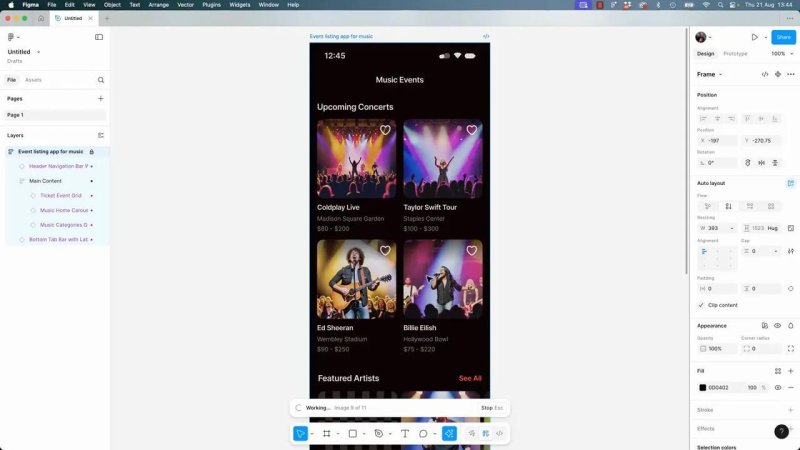
A short prompt gives us a music event layout with generated concert imagery.
You can use the same approach for a more specific screen, such as a checkout page for a music event app. The useful part is getting a concrete design to work with rather than starting with an empty frame.
A generated screen is not a working app
Open the result in the prototype player and try it out. It looks like an app, but initially it is mostly a mock-up. There is not much interactivity.
Visual completeness and functional completeness are different things. First Draft gives you the former as a starting point. You still need to inspect the layout, refine the design and connect the appropriate interactions.
Customise colours, corners, spacing and fonts
Once the first design exists, you can explore its visual direction using the available styling controls. This is one of the nicest parts of the workflow: you can quickly try alternatives without manually changing every individual element.
Colours: switch between colourways to explore dark, light and more colourful treatments.
Corner radius: try heavily rounded corners or remove the rounding for a boxier look.
Spacing: open up the layout and see how a roomier arrangement feels.
Fonts: experiment with different typefaces.
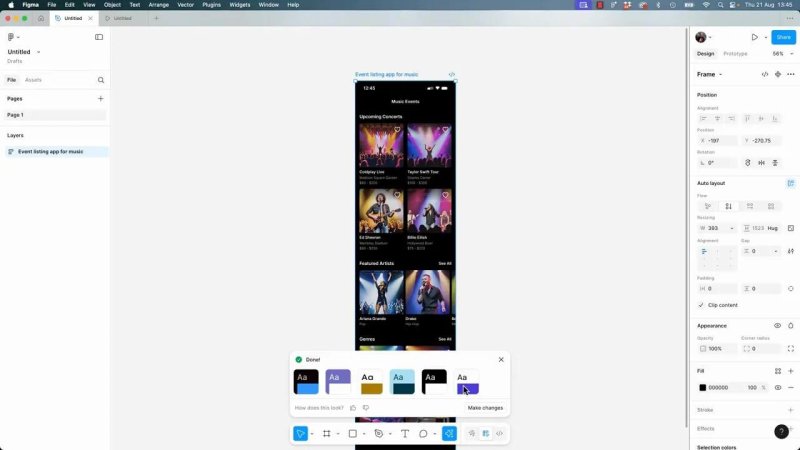
Switching colourways is a quick way to explore a different visual direction.
This feels familiar if you have used templates before. You are not accepting the first result as the final design. You are using it to find a direction, then making it your own.
Use follow-up prompts, but know when to edit manually
You can also ask First Draft to change the design. For example, I tried asking it to add a large hero area.
It produced a version of that idea, but not quite the one I had in my head. That is the tricky bit. A prompt can describe what you want, yet the result may still need adjusting.
For many small changes, I would simply make the edit myself. Use prompting when it saves work, not when it turns a quick adjustment into several rounds of explaining. The more comfortable you are with Figma, the easier that judgement becomes.
Check what First Draft has not built
A polished-looking screen can hide quite a lot of unfinished work. In this example, checking the document showed that it had not created a reusable asset library or styles for the design.
That matters when you want to develop the idea beyond one attractive screen. There is still work to do connecting the design to styles, Auto Layout and variables.
First Draft becomes more useful as your Figma skills improve. You can take the generated result, understand how it is put together and turn it into something more consistent and useful. It is not a substitute for learning the tool or developing your UX design judgement.
Generate a second screen, then check consistency
Next, try creating an event detail screen to go with the music listing. Return to First Draft and describe the new screen you need.
In my example, I prepared an empty frame for it, but First Draft created a separate new frame instead of filling the one I had made. So do not assume it will use your intended destination.
More importantly, the new screen did not automatically inherit the same typography. One design used Public Sans, while the other used Outfit.
They belonged to the same general app idea, but they were not a fully consistent set of screens. You need to check the fonts, colours and other visual decisions rather than assume the AI has matched them.
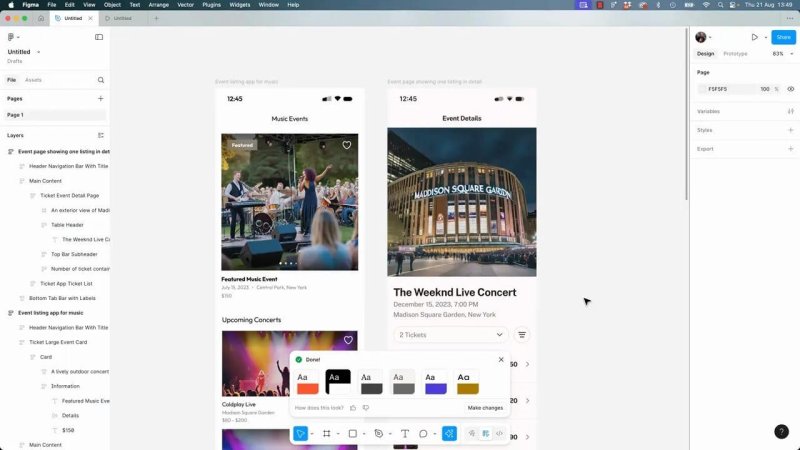
Generating a second screen gives us more to work with, but consistency still needs checking.
What I would love is to request a straightforward terms and conditions page or a trustworthy-looking checkout page and have it automatically adopt the existing design’s styles. That is the direction I am excited about, but it is not what this example delivers.
For now, think of First Draft primarily as idea generation followed by your own refinement.
Connect the screens with Add interactions
There is another useful AI feature alongside First Draft: Add interactions. Once you have the listing and detail screens, you can ask Figma to connect them.
Select the two screens you want to connect.
Open Actions and choose Add interactions.
Let Figma add the prototype connections.
Select the starting screen and press Play.
Test the route to the detail screen and the route back home.
In this example, the generated navigation worked: I could move from the listing to the detail screen and return home. That is a handy shortcut compared with starting every connection manually.
Still, test what has been added. The successful connections here demonstrate a basic route through the design, not a complete, fully functioning app.
Use AI as a starting point, just as you would a template
The way I am using First Draft is similar to the way I use templates. If I need a starting idea for a form or a common screen, it can help me get past the blank canvas quickly.
Traditional templates remain an option too. In the browser version of Figma, open the Figma menu, choose Home, and browse the available templates and community resources.
Neither route removes the need for design skills. Both give you something to evaluate, adapt and improve.
That is the exciting part of these AI features. They shortcut some of the initial work, while your knowledge lets you take the result further. Generate a draft, have a play with the styling, check what is missing, and then make it properly yours.
Key terms
First Draft
Figma’s AI-driven feature for generating an initial app or website design from a text prompt. It provides a starting layout rather than a finished product.
Wireframe and fidelity
A wireframe focuses on a screen’s structure with less visual detail. Higher-fidelity designs include more developed styling and imagery.
Hero area
A large, prominent section near the top of a screen. In this example, it was an addition requested through a follow-up prompt.
Add interactions
An AI feature that adds prototype connections between selected screens. Test those connections in the prototype player to check the navigation.
Styles, Auto Layout and variables
Figma features used to make designs more consistent and manageable. They are part of the work needed to take a generated draft further.
FAQs
Is Figma First Draft a paid feature?
In the version used for this example, First Draft is a paid feature. Look for it through Actions under Design Tools, or search for its name.
Does First Draft automatically match existing styles?
Do not assume it will. The separately generated screens in this example used different fonts, so checking and correcting visual consistency was still necessary.
Can First Draft create an interactive prototype?
The initial result is mainly a visual mock-up. Use Add interactions to create connections between screens, then open the prototype player and test the routes.
Do I still need to learn Figma?
Yes. Figma skills help you refine layouts, fix inconsistencies, make precise edits and connect the result to styles, Auto Layout and variables. First Draft is more useful when you can confidently improve what it generates.
Written by Daniel Walter Scott — Founder of Bring Your Own Laptop & Chief Instructor
